
TheHurrican Tech Desk — September 30, 2026
Somebody on our team spent twenty minutes last week pressing a button that wasn’t there. True story. Newer AirPods case, old instructions pulled up on their phone, holding down on a spot where the reset button used to live before Apple redesigned the thing. That’s basically why this piece exists — half the reset guides out there are describing hardware that doesn’t match what’s actually in your hand anymore.
So let’s sort out which version you’re dealing with first, then walk through it properly.
The Short Version
- Phone or iPad: Settings, Bluetooth, tap your AirPods, Forget This Device.
- AirPods go back in the case. Lid shut. Thirty seconds, roughly.
- Got a setup button on the back (AirPods 1-3, Pro 1st/2nd gen)? Hold it about 15 seconds — amber, then white.
- No button (AirPods 4, 5, Pro 3)? Open the case, double-tap the front, wait for white, tap again.
- AirPods Max: Digital Crown plus Noise Control button, held together, roughly 15 seconds.
Model-by-Model Breakdown
| AirPods Model | Case Button? | Reset Method |
|---|---|---|
| AirPods 1, 2, 3 | Yes | Hold setup button ~15 sec |
| AirPods Pro (1st & 2nd gen) | Yes | Hold setup button ~15 sec |
| AirPods 4 (Standard & ANC) | No | Double-tap the case twice |
| AirPods 5 | No | Double-tap the case twice |
| AirPods Pro 3 | No | Double-tap the case twice |
| AirPods Max | No case | Digital Crown + Noise Control button |
The Button Disappeared, and Nobody Really Announced It
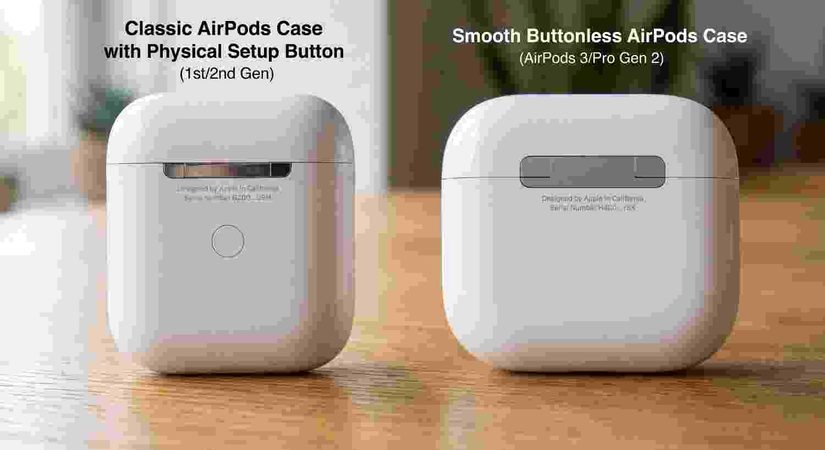
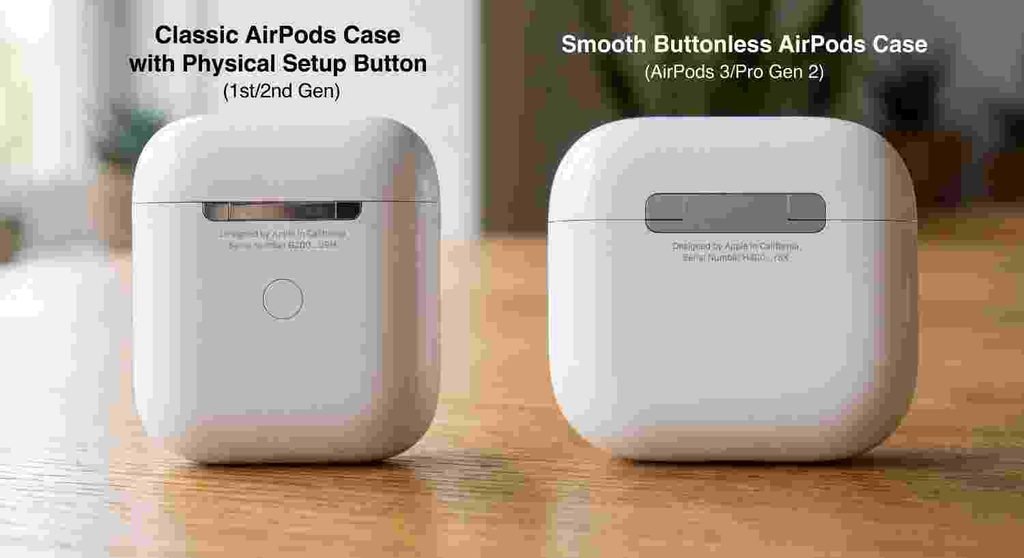
Apple redid the case for AirPods 4 and the third-gen Pro model, and the physical setup button just quietly went away in the process. No big press release moment for it. If your case has that small dimpled circle on the back, congratulations, you’ve got something from the AirPods 1-3 or original Pro generations. If it’s smooth plastic back there, nothing to press, you’re on newer hardware, and the old trick simply won’t register no matter how hard you push. Most people assume they’re doing something wrong. They’re not. The button they’re looking for isn’t manufactured anymore.
Step Zero, Basically: Forget the Device
This part gets skipped constantly and it’s the reason resets sometimes appear to fail. Before anything else, dig into Settings, Bluetooth, find your AirPods sitting there in the list, tap the little “i” next to them, and choose Forget This Device. Without this, your phone tends to snap right back into the old pairing the instant the AirPods come back on, before the actual reset process even has a chance to complete.
If You’ve Got the Button (AirPods 1-3, Pro 1st/2nd Gen)
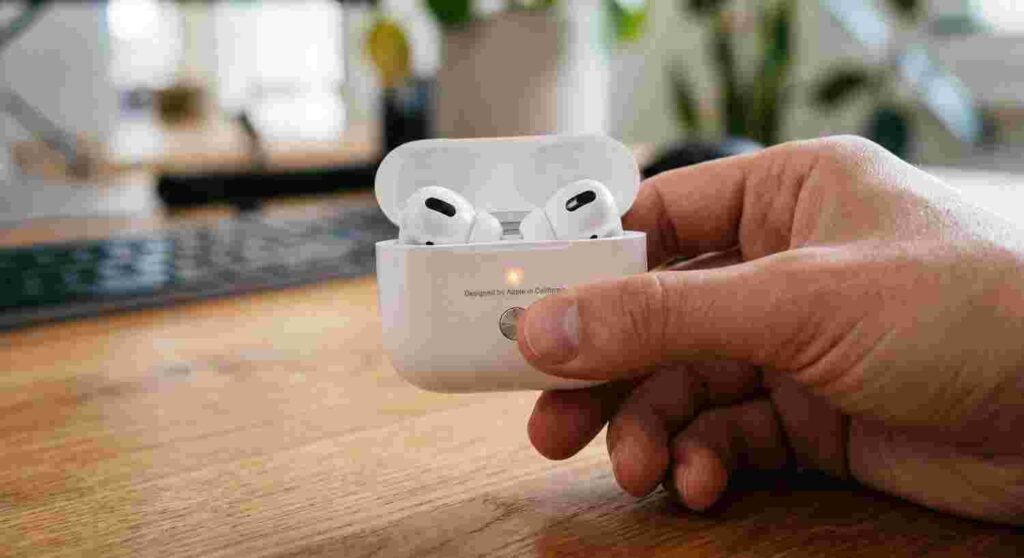
Close both AirPods in the case. Give it half a minute. Pop the lid back open, locate that button, press and hold — you’re looking at around 15 seconds here. Keep your eyes on the status light: amber shows up first, then it shifts over to solid white. White’s the signal. Done. The AirPods are sitting there acting like they’ve never been paired to anything.
If You Don’t Have the Button (AirPods 4, 5, Pro 3)
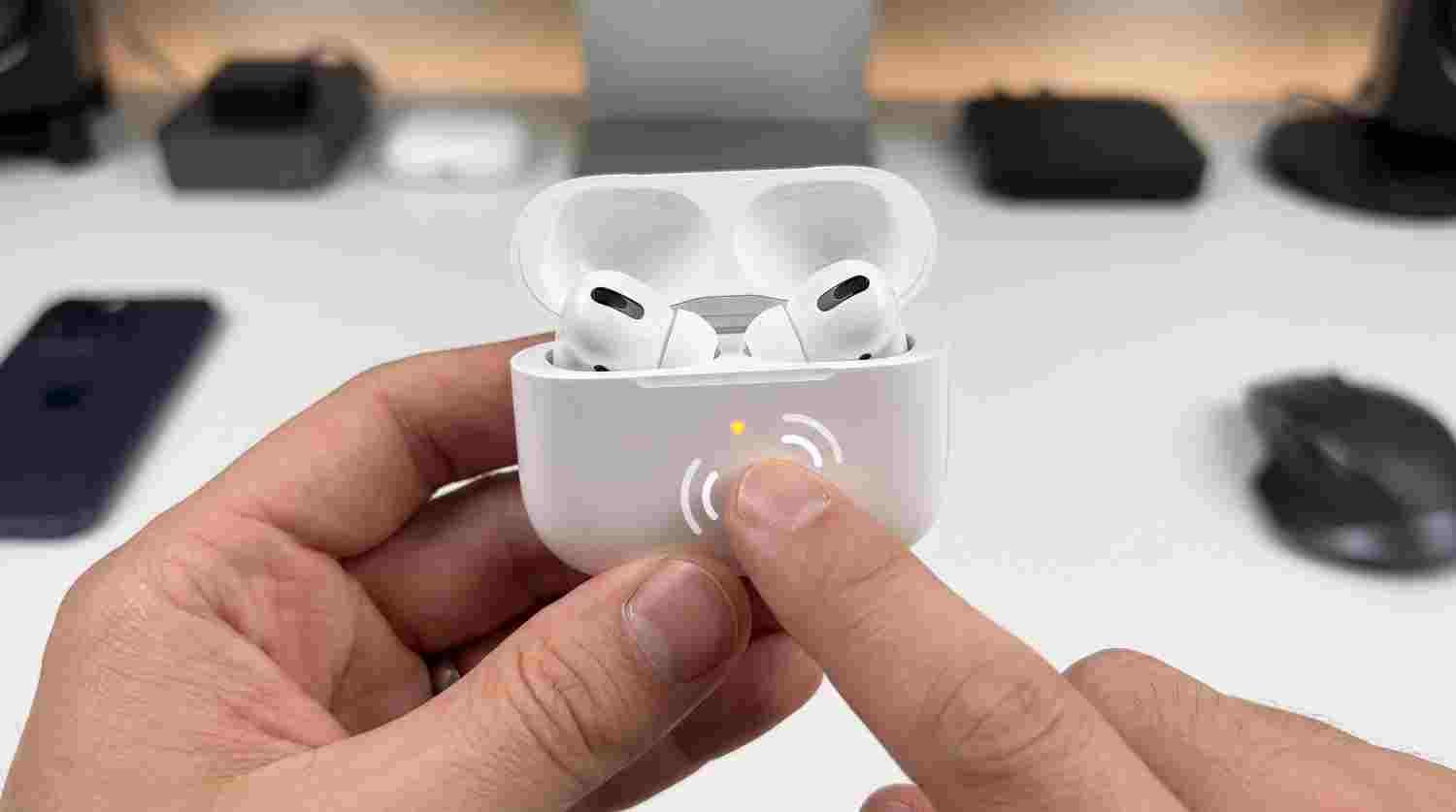
Same 30-second closed-lid wait to start. Open it back up, and instead of hunting for a button, you’re tapping the case itself — twice, on the front. A light shows up. Wait for it to switch to white, then tap twice again to lock in the reset. That second round of tapping is where people mess up most — they see the white flash, assume it’s done, and walk away before confirming. It’s not done until that second tap happens.
AirPods Max Works Completely Differently
No case to speak of, obviously, so the whole process lives on the headphones themselves. Hold down the Digital Crown and the Noise Control button on the right ear cup at the same time. Here’s the trick people miss: hold for about 10 seconds and let go, and all you’ve done is restart them. Not reset. Keep your fingers on both buttons past that point, closer to 15 seconds total, and you’ll see the amber-to-white light sequence that actually confirms a real reset happened.
Your Apple Account Still Remembers Them
Quick but important note if you’re planning to sell these or pass them to a family member: a reset clears local settings and pairing history, full stop, but it does nothing to Apple’s Pairing Lock system, which lives at the account level rather than on the hardware itself. Go into Find My, or your Apple Account settings directly, and remove the AirPods there too. Skip that and whoever inherits your old pair could end up locked out despite a technically successful reset on your side.
Why People End Up Here in the First Place
Sound only playing in one ear. Connection just refusing to happen. Random cutouts during a call. The case not showing up as an option when you crack it open near your phone. A reset clears out the mess of stored Bluetooth data behind most of these, and it’s genuinely the first thing worth trying before you start suspecting actual hardware failure.
Just Bought an iPhone 18?
Pairing hasn’t changed at all — open the case near your iPhone 18 Pro or Pro Max, tap Connect when it pops up, and you’re set, whether or not you’ve reset the AirPods first. Same story if you’re already on iOS 27 — the Bluetooth menu where all this Forget This Device business happens looks and behaves exactly the way it did on earlier software.
Reset Fixed the Connection, But ANC Still Feels Weak?
That’s an unrelated problem, not a pairing one. We’ve got a separate breakdown on using noise cancellation on AirPods that covers the fit test and the usual culprits behind weak cancellation.
Frequently Asked Questions
My AirPods case doesn’t have a button. How to reset airpods?
Close them in the case for 30 seconds, open it, double-tap the front twice — once to start, again after the light flashes white to confirm.
Where did the reset button go?
Apple removed it starting with AirPods 4 and the third-generation Pro. A double-tap gesture replaced it.
Does resetting unlink AirPods from my Apple Account?
No, that’s a separate step. Handle it through Find My or your account settings directly.
How long should I hold the AirPods Max buttons?
Around 15 seconds for a genuine reset. Ten seconds just restarts them.
Can a reset fix a connection problem?
Most of the time, yes — it clears out corrupted pairing data, which is behind a large chunk of dropout and won’t-connect complaints.
Current as of September 30, 2026, based on Apple’s official AirPods lineup and reset process.